- Overview
- What is EC21?
- How to Buy?
- How to Sell?
- My EC21
- Basic Service
- Premium Service
-
- - My Company Website
- - My Buyer Marketing
- - My Biz Statistics
- - My Private Showroom
My Private Showroom
What is My Private Showroom?
Private Showroom is an online product catalog only available to your selected buyers, not to the public. If you have some products that you want to show only selected buyers, you can create a Private Showroom. It is like Managing Group, but a bit different in a way that Private Showroom is shown to invited buyers only.
How can I Manage Private Showroom?
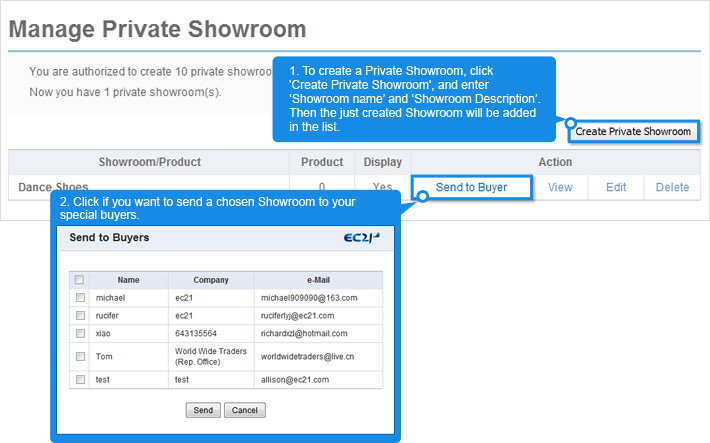
You can manage it at My EC21 > Premium Services > Manage Private Showroom.
To manage Private Showroom, you need to post Private Products first. Once you create Private Showroom, you can send your Showroom or/and Product to the buyers whom you saved personally or from your inbox.
To manage Private Showroom, you need to post Private Products first. Once you create Private Showroom, you can send your Showroom or/and Product to the buyers whom you saved personally or from your inbox.
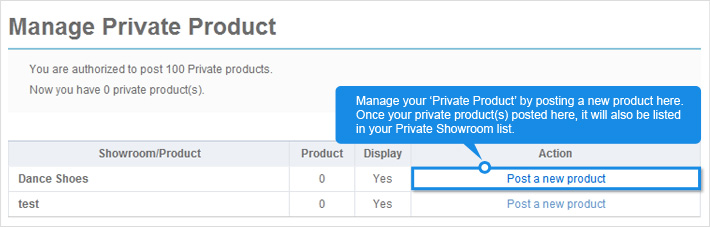
How can I Manage Private Products?
In order to manage Private Showroom mentioned above, you will need to post Private Product(s) first. (*Posting a private product works in same method as posting products : How to post Products? )
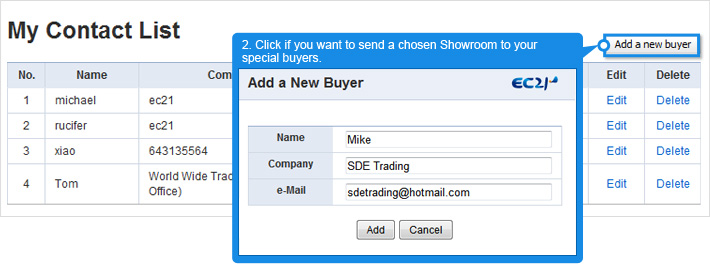
What is My Contact List?
You can manage the list of buyers you wish to contact privately. To add a new buyer, simply click "Add a new buyer" button, and then complete the fields in the pop up browser, and click "Add".