- Overview
- What is EC21?
- How to Buy?
- How to Sell?
- My EC21
- Basic Service
- Premium Service
-
- - My Company Website
- - My Buyer Marketing
- - My Biz Statistics
- - My Private Showroom
Special Services
What is My Inquiry Statistics?

Monthly Chart (Last 6 Months)
This shows you the number of inquiries you have received for the last six months in a form of monthly chart.
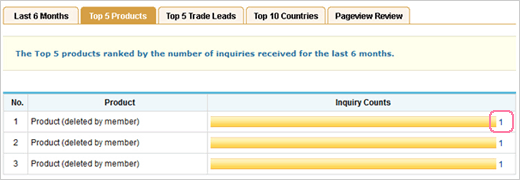
Top 5 Products
The chart shows you the top 5 products ranked by the number of inquiries received for the last 6 months. To view the list of inquiries received from one of the five product catalogs, click the number next to the bar in the chart.

Top 5 Trade Leads
The chart tells you the top 5 selling leads ranked by the number of inquiries received for the last 6 months. To view the list of inquiries received from one of the five trade leads, click the number next to the bar in the chart.
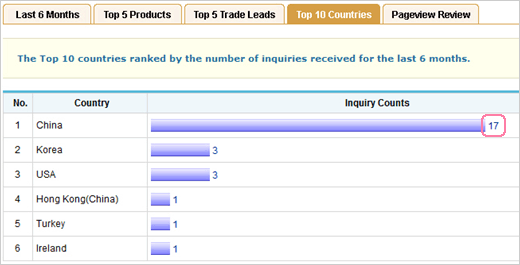
Top 10 Countries
The chart shows the top 10 countries ranked by the number of inquiries received for the last 6 months. To view the list of inquiries received from one of the ten countries, click the number next to the bar in the chart.
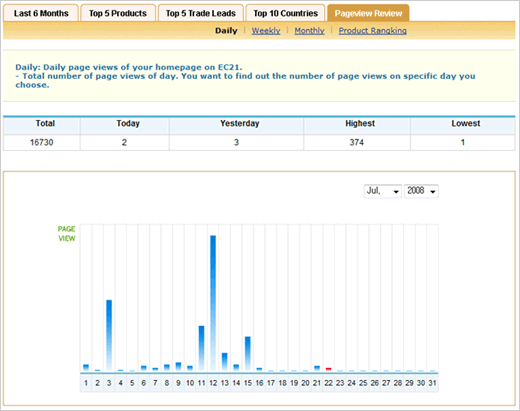
Pageview Review
Here you can see Pageview of your EC21 homepage by Daily, Weekly and Monthly. Also, you can see the ranking of your products ordered by the number of page views. Check it now and find out what buyers want the most.
How does Special Circular Letters work?
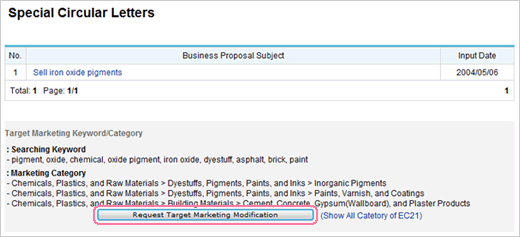
Review the business proposal carefully by clicking the subject, and if you want to modify something, click the button, "Request Target Marketing Modification" for request.

When you see the Request form as above, write comments in the textbox and then click "Submit" button.
How can I use Credit Report?
As a Trade PRO member, you can order up to 4 credit reports for free.


To request a credit report of a company
- 1Click "Request Credit Report" button.
- 2Fill out the form and click 'Submit' button, and then your request will be submitted.

Once your request has been completed, the result of report will be shown as above. To view the credit report, click the company name you submitted for credit request.
How can I Change URL?
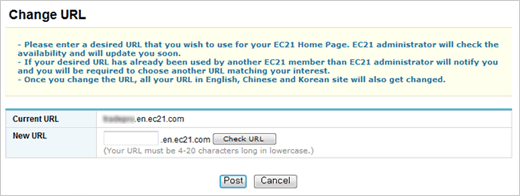
To change the URL, enter the new URL you wish to have and click 'Post'. After you URL is changed, EC21 site administrator will send you a notification e-mail.
